AI manga translator that does not invent dialogue
Drop a manga page (PNG or JPG) and I will letter it in English. 1 free watermarked page per day, no account.
This AI manga translator takes a page you drew, or are authorized to translate, from Japanese, Korean, or Chinese into English. Upload it in the box above: the text on the page is read, translated, and lettered back into the same bubbles, and the finished page appears next to your original.
Overlay translators float a box of English over the original glyphs and leave the Japanese underneath. Here the original lettering is cleared and the English is lettered in its place, so the page reads like an English edition rather than a page with notes stuck on it.
The first page each day is free, carries a watermark, and needs no account. You can finish it without leaving this page: choose a PNG or JPG, tick the permission box, wait for the human check, and press the button.
How the AI manga translator works
Step 1, upload. Choose one PNG or JPG page, or drag it onto the upload box. Confirm that you are the author or have permission to translate the work, and wait for the human check. A chapter saved as a PDF or a ZIP has to be unpacked into page images first.
Step 2, reading the page. A vision model finds every text region on the page: dialogue, captions, titles, and sound effects. For each one it records the reading order, where it sits on the page, and the original text exactly as written. This step only reads. It does not translate.
Step 3, translation. A text model drafts a short glossary of the names, places, and recurring terms on the page, then translates each text region into English, using the glossary whenever one of those terms appears. On later pages of the same project, the earlier pages are passed along as context, so a conversation that runs across a page turn still reads as one conversation.
Step 4, lettering. The image model receives your page together with the finished English lines. It clears the original text and letters those lines in the same places. It is instructed not to translate, add, or rewrite anything on its own, so the words on the finished page come from the translation step, not from a second guess by the image model.
Step 5, the result. The original and the translated page appear side by side under the upload box, with a download button. The free page is lettered once at 1K resolution, with a watermark, and you can save it as a PNG straight away.
Why it does not invent dialogue
An image model asked to “translate this page” in a single step can change words, drop a line, or letter something that was never in the original. Splitting the job avoids that. The text step produces a fixed list of lines, one per text region, and the image step is only given that list to letter.
The glossary keeps a name spelled the same way across the pages of a project, so a character is not “Kenta” in one panel and “Kenta-kun” or “Kent” in the next unless the original says so.
It is still machine translation. Read the English before you publish, especially jokes, honorifics, wordplay, and names, and look closely at any bubble where the lettering seems crowded.
Getting a good result from one page
Upload the page at its original resolution. Small or blurry text is harder to read, and a bubble that is cut off at the edge of the image cannot be relettered cleanly.
Clean digital pages work best, such as artwork exported straight from your drawing program before any heavy compression. A page with very dense text, or text drawn across the art rather than inside a bubble, deserves a closer look after lettering.
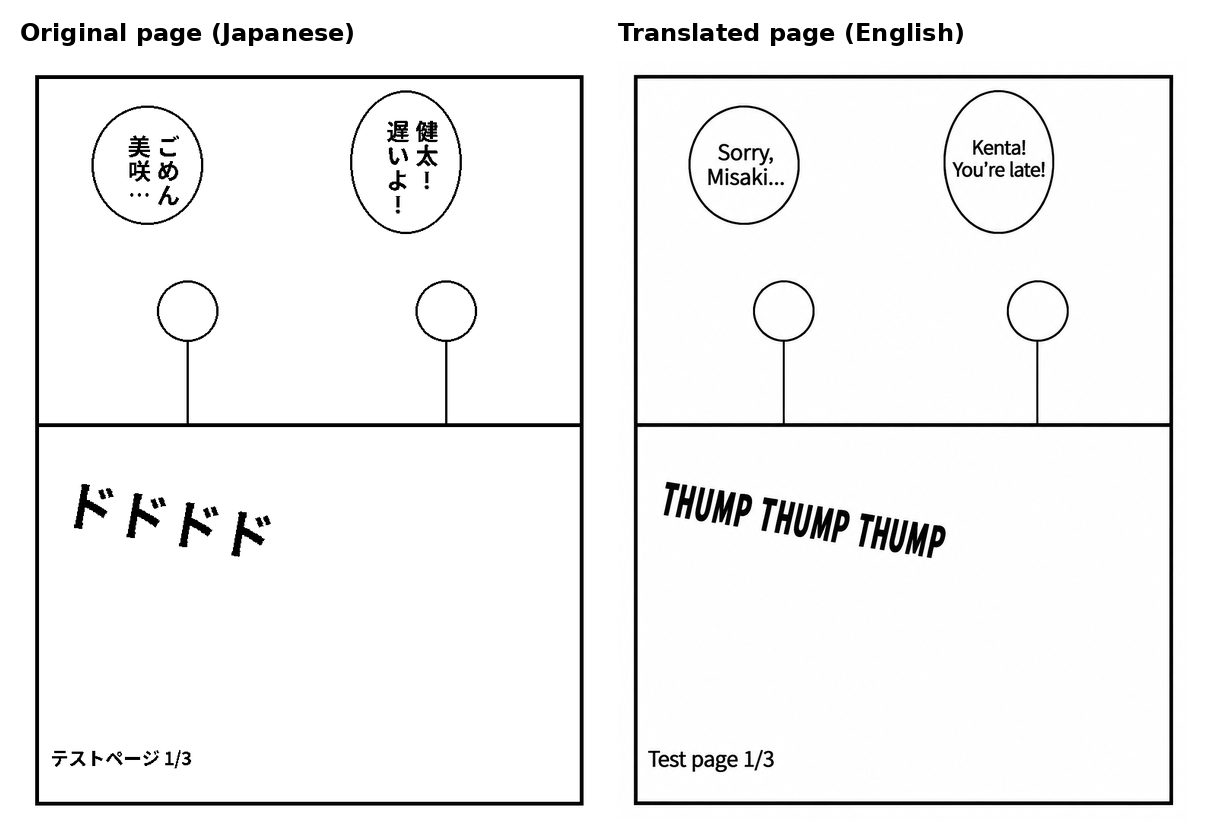
Vertical Japanese text works: it is read in reading order and the English is lettered horizontally inside the same bubble, as in the example below. Sound effects are translated too, for example ドドドド becomes THUMP THUMP THUMP.
The free page and page packs
One page per day is free for guests, with no account and no card. The limit is counted per browser and per IP address, and the free page is lettered once at 1K with a watermark. It is not redrawn automatically.
After the free page, pages come from one-time packs: $9 for 20 pages, $19 for 45 pages, $49 for 120 pages. There is no subscription. Buying a pack removes the watermark from your trial page without redrawing it. Credits return only when the job fails and no image was stored. Rerunning a page you are not happy with uses 1 page credit.
Who it is for
Manga authors, doujin circles, and independent creators who want an English edition of their own work, and small studios or publishers working on titles they have licensed.
It is not a reader tool. There is no reader mode, no raw hosting, and no overlay for someone else’s site. If you want to read a series in English, look for its licensed release.
Example: AI manga translator before and after
Related pages
- Translate a manga panel: crop one panel and check the lettering before a whole chapter.
- Translate manga to English: take a chapter from upload to an English ZIP or PDF.
- Pricing: one-time page packs, no subscription.
- Manga PDF translator: translate a chapter PDF into an English edition.
Questions
Which languages does the AI manga translator support?
Source text in Japanese, Korean, or Chinese, translated into English.
Can I try it without an account?
Yes. Upload a page on this page. One watermarked page per day is free, with no account and no card.
Does it change my artwork?
The image model is instructed to replace only the lettering and to keep the art, panel borders, and screentone as they are. Compare the result with your original before you publish.
How is this different from an overlay translator?
An overlay puts a box of English on top of the original text. This tool clears the original lettering and letters the English inside the same bubble.
Can I translate someone else’s manga with it?
No. You must be the author or authorized to translate the work. It is not for reading raws or scans.
What does it cost after the free page?
Pages come from one-time packs: $9 for 20 pages, $19 for 45 pages, $49 for 120 pages. There is no subscription.